
Sometimes, you just need your mobile phone to act like a phone. After a recent update to the Android operating system – Android 9, July 1 security patch – on my Samsung Galaxy Note 9, I was unable to answer a phone call from the lock screen. I could press the call answer or hang up icons, and could see that the touchscreen was registering my touch by the expanding glow around each icon as I tapped or pressed it, but nothing else would happen! Also, I could not dismiss the incoming call screen, nor could I unlock the phone until the caller hung up.
My phone was possessed! I could answer calls normally if they came in while I was playing with another app on my phone. I could unlock my phone if there was no incoming call in the way. But if a call came in while the phone was sitting, idle, on a table or in my purse or pocket, I would miss it.
I was about to do a factory reset – the only way to squash virtual gremlins with 99.8% certainty, but then that’s hours of reinstalling apps and files from backups and I wasn’t in the mood.
Then, while waiting on @TmobileHelp (the best support staff EVER) to figure out what on earth might be going on, I found two threads on Android Central:
- First clue – others can’t answer calls from lock screen after updates
- Second clue – it may be an accessibility “feature”
I am not sure whether this problem is unique to the OneUI overlay Samsung introduced, but something changed with the last update – even if you figured out that you needed to enable one of the accessibility features to make it easier to answer calls, you may have disabled what is now crucial to this feature continuing to work correctly, so read on!
How to Fix the Problem: Enable Assistant menu > Single tap to swipe
You’ll need to enable the Assistant menu. It’s not enough to have enabled it and turned on the Single tap to swipe feature, then turned it back off. You now need to leave it on, but you can still banish the menu after turning the feature on.
- Go to Settings > Accessibility > Interaction and dexterity > Assistant menu
NOTE: On Samsung Galaxy Note 9, a long press on Accessibility takes you to Interaction and Dexterity. Likewise, a long press on Interaction and dexterity takes you to the third screen, below. Slide the switch to enable Assistant menu as shown.


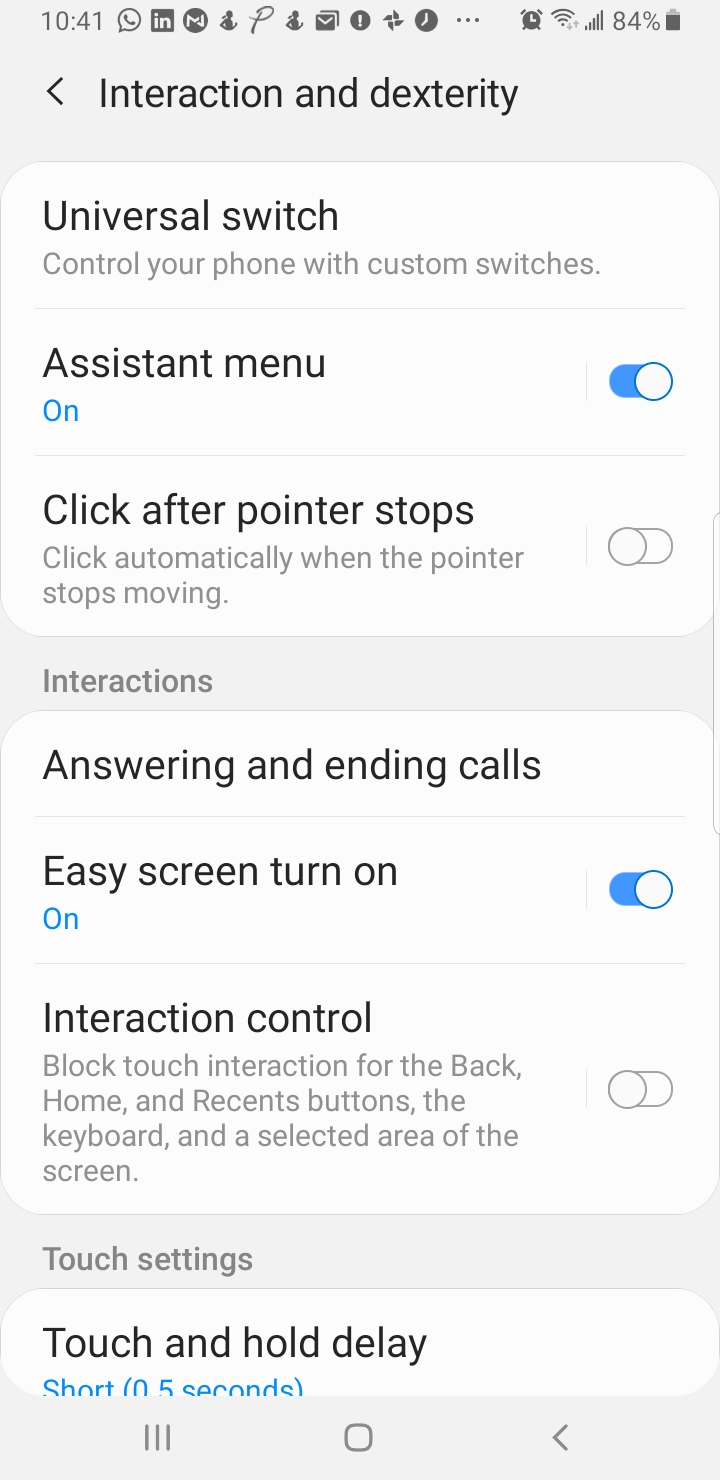
- Long press on Assistant menu, after enabling it.
- Enable Single tap to swipe.

- To lose the floating Assistant menu (the circle with four squares, shown below) without turning the feature off, go to the Home screen then press and hold the icon until an X appears at the top or bottom of your screen (hard to screenshot this one, so just watch for it), and drag the Assistant menu icon to it and drop it on the X.

I hope this saves you some frustration, if you’ve come here searching for a solution to “why my phone locks up when I get a call” or “why I can’t answer a call from the lock screen.”
UPDATE – Why Does Samsung Do The Things They Do??
At least as far back as the Note 20 (which I still have, since every hardware “upgrade” since the Note 5 has seemed designed mainly to appeal to people seeking status, rather than real, functional improvements and I’m not falling for it till at least next year), you simply cannot do this anymore. You can certainly enable the single-tap to answer feature:
- Go to: Settings > Accessibility > Interaction and dexterity.
- Toggle on Assistant menu, then tap the text to see detailed options.
- Find Single tap to swipe and toggle it on. The assistant menu will be enabled.
BUT, now you’re stuck with the @#$%^ floating accessibility menu that will get in your way at every turn. I’ve concluded that it’s just not worth it for most of us, and have learned to swipe the button to the right to answer a call.
Who calls, these days, anyway?
Samsung may be losing me to Pixel, next time I buy a phone. They’re camera is going to need to be a stunning improvement, and not just “AI enhanced.” I don’t use, need, or want AI filters unless I’m playing around after the fact.
NOTE: I’m still sad that this is still the post that brings so many new people to my blog. Please, stick around and read some of the more recent ones, too!
UPDATE: With the latest update to Android on Samsung 25+, I’m able to tap the phone icon from the lock screen to answer a call. Still not sure why I didn’t get the Pixel, though.

Although, I’m not on Android platform but thank you for the information and making the software better.
This one came through.
My pleasure! Thank you for reading (and sharing with friends who don’t have Siri!)
Although, I’m not on Android platform but thank you for the information and making the software better.
This one came through.
My pleasure! Thank you for reading (and sharing with friends who don’t have Siri!)
I guess I’m lucky to have the Galaxy S9 because my update worked just fine. Still, you’re being helpful; what a nice lady you are! 🙂
Aww, thanks!
I try. 😉 And my dad has an iPhone. He’s had a similar issue with it, and had to do a hard restart. That clue set me on a path to discovering the ACTUAL solution for Samsung Galaxy users (I think this IS related to the OneUI interface.)
I guess I’m lucky to have the Galaxy S9 because my update worked just fine. Still, you’re being helpful; what a nice lady you are! 🙂
Aww, thanks!
I try. 😉 And my dad has an iPhone. He’s had a similar issue with it, and had to do a hard restart. That clue set me on a path to discovering the ACTUAL solution for Samsung Galaxy users (I think this IS related to the OneUI interface.)
I guess, now I know where to come if I face a problem with my phone. 🙂
Um, anywhere but here? LOL
I guess, now I know where to come if I face a problem with my phone. 🙂
Um, anywhere but here? LOL