
I mentioned a few times that I have deleted nearly 15 years of my posts on Facebook. A few friends asked me “How did you do that?” because the obvious answer would have been to delete my Facebook account entirely and leave it vulnerable to being hijacked by spammers and scammers and other miscreants that are so numerous on that, and other social media platforms.
The slightly better answer, in short? It’s easy, but it is tedious and time-consuming. It’s something to do while you’re watching TV. Better than doomscrolling the moment you wake up. Probably not as effective as you might hope in preventing content misuse by Meta, since they don’t actually promise to honor your deletion request immediately, or after the 30-day “don’t you want to change your mind” period ends, or after the additional 90-day “we’ll get around to it if we feel like it” ends.
Here are the relevant portions of Meta’s Terms of Service as they stand today, 1/31/2025:
- where your content has been used by others in accordance with this license and they have not deleted it (in which case this license will continue to apply until that content is deleted);
- where deletion within 90 days is not possible due to technical limitations of our systems, in which case, we will complete the deletion as soon as technically feasible; or
- where immediate deletion would restrict our ability to:
- investigate or identify illegal activity or violations of our terms and policies (for example, to identify or investigate misuse of our Products or systems);
- protect the safety, integrity, and security of our Products, systems, services, our employees, and users, and to defend ourselves;
- comply with legal obligations for the preservation of evidence, including data Meta Companies providing financial products and services preserve to comply with any record keeping obligations required by law; or
- comply with a request of a judicial or administrative authority, law enforcement or a government agency;
Got all that? So, on the one hand, when you send some piece of content to the Trash bin on Meta, that should start the clock. You can choose to retrieve that content from Trash at any time during the 30 days unless you empty the Trash itself. (Windows users should recognize this as similar to the Recycle bin.) That’s all well and good, but then Meta claims an additional 90-day period during which they’ll start the actual deletion if and when they get around to it. We’re up to 120 days, now, for those of you who are counting. During this time – and possibly forever – you will see things pop up in Memories that shouldn’t be there anymore, putting into question whether Facebook honors its own TOS or not. (It’s a rhetorical question.) Note the weasel words: “where deletion within 90 days is not possible due to technical limitations of our systems, in which case, we will complete the deletion as soon as technically feasible” and the claim of license in perpetuity. Till we get around to it, basically.< /br>< /br>
But it made me feel better to do it. They may already have used my content to train AI. They may keep my content haunting their servers until the sheer weight of their data center causes a sinkhole. I don’t advise bothering with this unless you’re just incredibly bored and need to do something with your hands. But here’s how, if it makes you feel any better.
- Request a backup of all your Facebook data.
- Wait until you are notified by Facebook that your backup is ready for download (this usually takes a few days – they are incredibly slow – you’d think hamsters actually ran the servers or something). They will email you a link.
- Download all your data, then open or extract the backup to see what is and what is not in it. You will not receive your friends’ contact information for privacy reasons.
- Now, go to Settings & Privacy > Activity Log.

- From Filters, choose a Date range. (Or don’t – I did not want to delete my most recent activity, so I started with the oldest years and worked forward to the most recent month.)
- Choose the type of content you want to delete (there is no nuclear option, here – you will have to do this bit by bit by tedious, boring bit). The screenshot only shows about half of the different things you’ll find under your Activity log. I started with Posts. After all, once a Post is deleted, all the conversation on it also disappears. This seemed the most efficient approach.
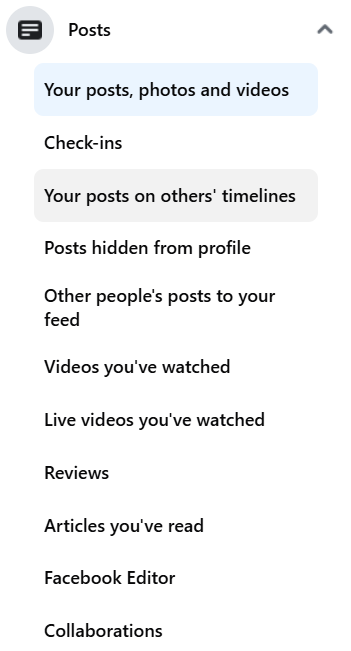
- Posts expands to show this:

- Next, Select Your posts, photos, and videos. To the right, you should now see a list of posts within your selected date range with check boxes to their left. By default, Facebook will only show you 25 of them at a time. If you want to do this the SUPER tedious way, click All > Trash. After about 5 times of this, you discover exactly how much crap you’ve been posting on Facebook over the years and you will be tempted just to give up. That’s their hope, anyway. I can only assume that’s their hope, or surely Meta would’ve made bulk deletion easier by now. It’s better than LinkedIn, which doesn’t have any bulk deletion capability at all, other than “Delete my account.”LESS tedious method: Scroll down the page until you can see approximately 6-7 screens worth of posts. (The hard limit on this is 250, so if you select more than 250 at a time, you’ll get an error and have to start over again. Now that’s what I call the MOST tedious method!) Selecting All will only select what’s visible. If it says you’ve selected 251 or more posts, uncheck anything over 249. Why 249? Beats hell out of me. Leave 250 after you get the error saying you’ve exceeded the maximum number of posts you can delete, and you’re likely just to get the same error over again and have to start from scratch. This will make more sense the first time you do it. After the fourth or fifth time, the painfulness of it sinks in and you’re not likely to forget this tip.Select 250, Trash. Repeat. Ad nauseum. This could take weeks, if you’ve been on Facebook for more than a minute.
Now, just when you think you’ve got everything, wait a few days more. Go back and spot check by year. I can almost guarantee there will be undeleted posts still lurking there.
Explore all the other sections of this Activity log page. Then check out the section under Settings & Privacy called Content preferences.
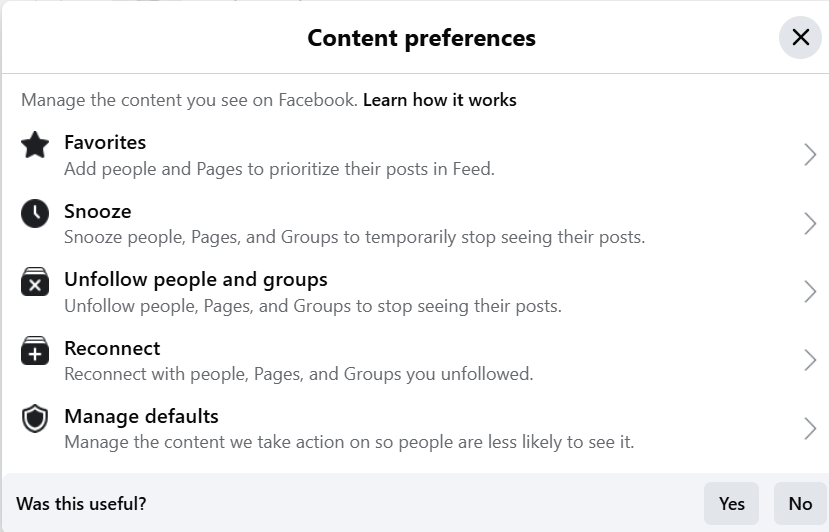
You may be surprised by what’s in there, and I can guarantee that deleting most of it will help to clean up your Facebook feed, at least till you gunk it all up again. And you will – never mind your best intentions – unless you delete your account or just refuse to log into it again.

I actually downloaded all my FB data years ago; I think it was in 2018. Did the same for Instagram; might have been around the same time. I’ve given thought to delete my FB page, but I’m connected to all the relatives on Dad’s side of the family; I’d rather not lose contact with all of them. Guess I’m stuck; sigh…
This method lets you keep your account, your friends, etc. Just removes all or most of the past posts.